The Big Takeaways
- Manual scheduling increases deadline risk and slows litigation prep—digital calendaring centralizes updates, automates rules, and improves accuracy.
- Rules-based systems can help calculate deadlines, adjust timelines when court dates shift, and reduce administrative burden.
- CARET Legal connects deadlines to tasks, and reminders in one centralized view—helping firms stay organized, compliant, and confident.
Digitizing scheduling orders can help your firm move from scattered dates to a clear, reliable workflow that everyone can follow. Once deadlines are organized in a digital system, attorneys can track what is coming, understand how dates relate to each other, and avoid the risk that often comes with manual counting.
As litigation grows busier and teams work across multiple locations, digital scheduling gives you a consistent way to stay organized and prepared for shifting timelines.
Why Digitizing Your Scheduling Order Matters for Deadline Tracking
Digital scheduling helps you move through fast-paced litigation with less scrambling. When one date shifts, related deadlines, prep tasks, and reminders shift with it. That creates a smoother chain of updates than paper notes or disconnected calendars ever could.
Automated rules-based triggers give your team a single place to see what has changed and why, which cuts down on the miscommunication that usually happens when several people track deadlines in different ways. Instead of comparing spreadsheets or searching through email threads, your team works from one accurate timeline.
Consistent deadline calculations also remove the guesswork from day counting. Holidays, weekends, and specific procedural rules apply automatically and in the same way every time. This limits the risk that two people calculate the same deadline differently and helps you avoid preventable timing mistakes.
A shared calendar view brings clarity to tasks that often fall through the cracks, especially prep work tied to hearings or filing windows. Everyone sees the same information at the same time, which makes it easier to plan ahead.

How Digital Scheduling Supports Matter Management
When scheduling data connects directly to your matters, daily work starts to feel more organized. Deadlines, tasks, documents, and communication logs all live in one place, which cuts down on duplicate entries and makes it easier to see the full picture of a case.
A unified calendar view lets you filter deadlines by matter, category, responsible attorney, location, and more. This helps you quickly understand what deserves your attention without sifting through multiple lists or systems.
Real-time updates also prevent the common problem of outdated timelines. Once a change is recorded, the system updates it everywhere it needs to appear. That keeps the entire team aligned, whether they are in the office or working remotely.
Automated workflows make it easier to respond when courts revise hearing or filing dates. Tasks that depend on those dates adjust automatically, which protects preparation time and helps you avoid bottlenecks. Firms can also build standardized workflows for recurring sequences like depositions, discovery schedules, or motion deadlines.
Why Legal Calendaring Software Improves Your Ability to Prioritize Deadlines
Digital calendaring helps you sort out which deadlines demand your immediate attention and which tasks can wait. When you can quickly separate court-driven requirements from flexible preparation work, your planning becomes more practical and less reactive.
Automated reminders reinforce this structure by keeping deadlines visible well before they approach. These alerts also help you spot conflicts early so you can adjust plans or redistribute work before it becomes a problem.
What Rules-Based Calendaring Adds to Your Digital Scheduling Order
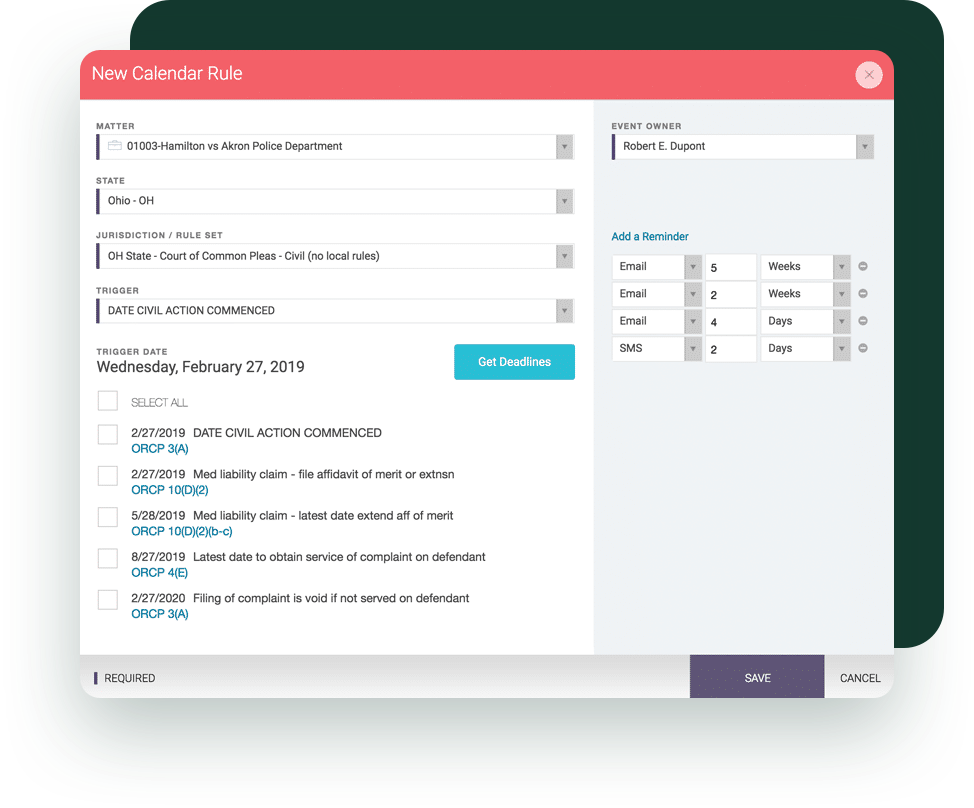
With the LawToolBox integration, rules-based calendaring removes the uncertainty from calculating deadlines. The system applies jurisdictional rules, timing requirements, and holidays automatically, which makes the entire process more consistent.
A single triggering event can create the entire sequence of deadlines tied to it. This makes it easier to see the timeline of obligations that follow a service date, scheduling notice, or court order.
If the court updates a hearing date, the system recalculates the related deadlines without asking you to redo the math. This reduces administrative work and limits the risk of a missed adjustment. Teams benefit from the consistency because everyone uses the same rules and the same timing scales, which keeps collaboration smooth.
How Digitizing Scheduling Orders Strengthens Internal Organization for Attorneys
Digital scheduling gives attorneys a clearer way to map out their day. Tasks and deadlines appear in one consolidated dashboard, which removes clutter and makes it easier to stay focused.
As schedules shift, attorneys can adjust prep time with less disruption. eminders replace handwritten notes and scattered inbox alerts, which helps keep tasks moving without constant manual oversight.
Shared scheduling views improve collaboration because attorneys and staff work from the same information. That transparency reduces confusion and helps teams plan together more effectively.
Better organization naturally reduces last-minute pressure. Attorneys can approach busy periods with a steadier plan and handle changing priorities without losing track of what matters most.
Digital Scheduling as Part of a Broader Transformation in Law Firm Operations
Digitizing scheduling orders aligns with a larger shift toward cloud-based systems that enable firms to stay organized, secure, and responsive. These tools support a more streamlined way of working by centralizing information that used to live in paper files or individual inboxes.
Clients benefit from this shift as well. With clearer timelines and faster updates, you can give them a better sense of where their matters stand and what they can expect next.
Virtual coordination tools make it easier for teams to work together across locations and schedules. Digital workflows reduce the firm’s reliance on any one person’s institutional knowledge because key information stays within the system. This creates a more stable operational structure and allows teams to make decisions with a clearer understanding of the entire case.
How Automated Scheduling Reduces the Risk of Missed Deadlines
Automated workflows strengthen your safety net because every critical deadline generates tasks, reminders, and events that reinforce each other. This layered approach helps attorneys stay on track, especially during hectic periods.
Syncing deadlines across matters eliminates the inconsistencies that often appear when teams manage separate calendars. Automation distributes responsibility across the system instead of placing it on one person, which reduces the chance of oversight.
Mobile and email reminders help you stay aware of upcoming events while in court or on the move. Centralized scheduling reduces confusion from multiple calendars or outdated notes.
A more reliable system decreases exposure to sanctions, default judgments, and other consequences that come from missed deadlines. Strong scheduling practices support better outcomes for both attorneys and clients.
How CARET Legal Supports Digitizing Your Schedule
A centralized, matter-based schedule gives attorneys and staff a single place to track hearings, filings, and preparation deadlines. CARET Legal brings these events together so you don’t have to compare multiple calendars to understand what is accurate.
Rules-based calculations apply jurisdictional timing consistently and remove the need to count days manually. When used with LawToolBox, CARET Legal recalculates dependent deadlines automatically as schedules change. This eliminates the need to adjust timelines across multiple systems. Preferred reminders and mobile access keep everything reachable, whether you are in the office, in court, or traveling.
Set Your Firm Up for Success With Digital Scheduling
Digital scheduling gives firms more control over deadlines and improves coordination across matters. With automated workflows, rules-based calculations, and centralized scheduling in place, teams can reduce risk and move through cases with greater confidence.
If your firm is ready to streamline scheduling, strengthen collaboration, and improve case preparation, explore how CARET Legal can support your transition to a digital workflow by requesting a free trial.