The Big Takeaways:
- Fragmented systems and manual processes drain billable time, with attorneys working 48 hours per week but billing only 36 on average.
- Centralized legal practice management software, automated workflows, and real-time time tracking recover lost hours without adding staff or extending workdays.
- Connecting time capture, invoicing, payments, and reporting in one platform shortens the billing cycle, improves realization and collection rates, and increases overall law firm efficiency.
Attorneys are losing time to fragmented systems, manual processes and administrative tasks that never make it onto an invoice.
According to Bloomberg Law’s 2024 Attorney Workload & Hours Survey, attorneys worked an average of 48 hours per week, yet only 36 of those hours were billable, with two out of every eight working hours going to administrative duties like tracking hours and managing projects.
The fix isn’t longer days or more staff. It’s removing the operational friction that stands between attorneys and billable work.
Step 1: Centralize Every Detail in One Place
When intake software, billing, document management, and case files all live in separate tools, attorneys re-enter the same client and case information multiple times per matter. Each manual entry wastes time and introduces the risk of errors that cascade into billing disputes, missed communications, or compliance issues.
An ABA study found that administrative errors, including incorrect calendaring, clerical errors, failure to file documents, and lost files, accounted for 23% of all malpractice claims.
How to Centralize Important Details
The first step toward recovering lost time is consolidating everything into a single system.
Choose a legal practice management software platform that houses case files, client data, contacts, documents, email, and billing in one place. When an attorney opens a matter, every related item should be visible from a single dashboard without switching between applications.
This alone eliminates two major time drains:
- Constant toggling between disconnected tools
- Duplicate data entry that comes with maintaining separate systems.
When contact and matter information lives in one platform that connects to billing, calendaring, and documents, data only needs to be entered once.
A few things to look for when evaluating platforms include:
- Single-source matter views. Every email, document, time entry, and task tied to a case should be accessible from one screen.
- Built-in email integration. Emails should file to matters automatically rather than requiring manual sorting or a separate plugin.
- Role-based access. Staff across the firm should be able to see what they need without compromising sensitive case data.
Step 2: Automate Repeatable Workflows
Without centralized task visibility, attorneys and staff rely on memory, sticky notes, or scattered email reminders to track deadlines and next steps. And when steps get missed, the cost shows up as blown deadlines, malpractice exposure, or lost client trust.
Most law firms handle certain case types repeatedly. Each one follows a predictable sequence of tasks, meetings, and filings.
Automating those sequences is one of the most effective ways to streamline law firm workflows and free attorneys from tracking every operational step manually.
How to Create Effective, Repeatable Workflows
Start by mapping out the case types the firm handles most frequently. Document every step from intake to resolution, including who is responsible for each task, when it should happen relative to other steps, and what triggers the next action.
Then build those sequences into workflow templates within your practice management platform.
A good workflow engine should let you:
- Auto-assign tasks to specific team members based on their role.
- Schedule events relative to other milestones (e.g., “file response 10 business days after service”).
- Set dependencies so downstream steps don’t appear until the prior step is complete.
Start simple. Pick one or two high-volume case types, build templates for them, and refine based on how the team uses them. Expand from there once the process is solid.
The payoff is consistency.
Every matter of the same type follows the same steps in the same order, regardless of which attorney is handling it. Nothing depends on someone remembering the next step.

Step 3: Track Time as You Work, Not After the Fact
The longer attorneys wait to record their time, the more billable work goes unrecorded.
A few hours of delay means lost entries. A few days means significant revenue left on the table. Multiply that across an entire firm, and the gap between work performed and work billed grows quickly.
The problem usually isn’t negligence. It’s that time tracking feels like a separate chore layered on top of an already full day.
How to Accurately Track Time
The most effective fix is making time capture a byproduct of working rather than an additional task. That means tracking time inside the same tools attorneys already use for email, documents, and case management.
Practical steps to improve firm-wide time capture:
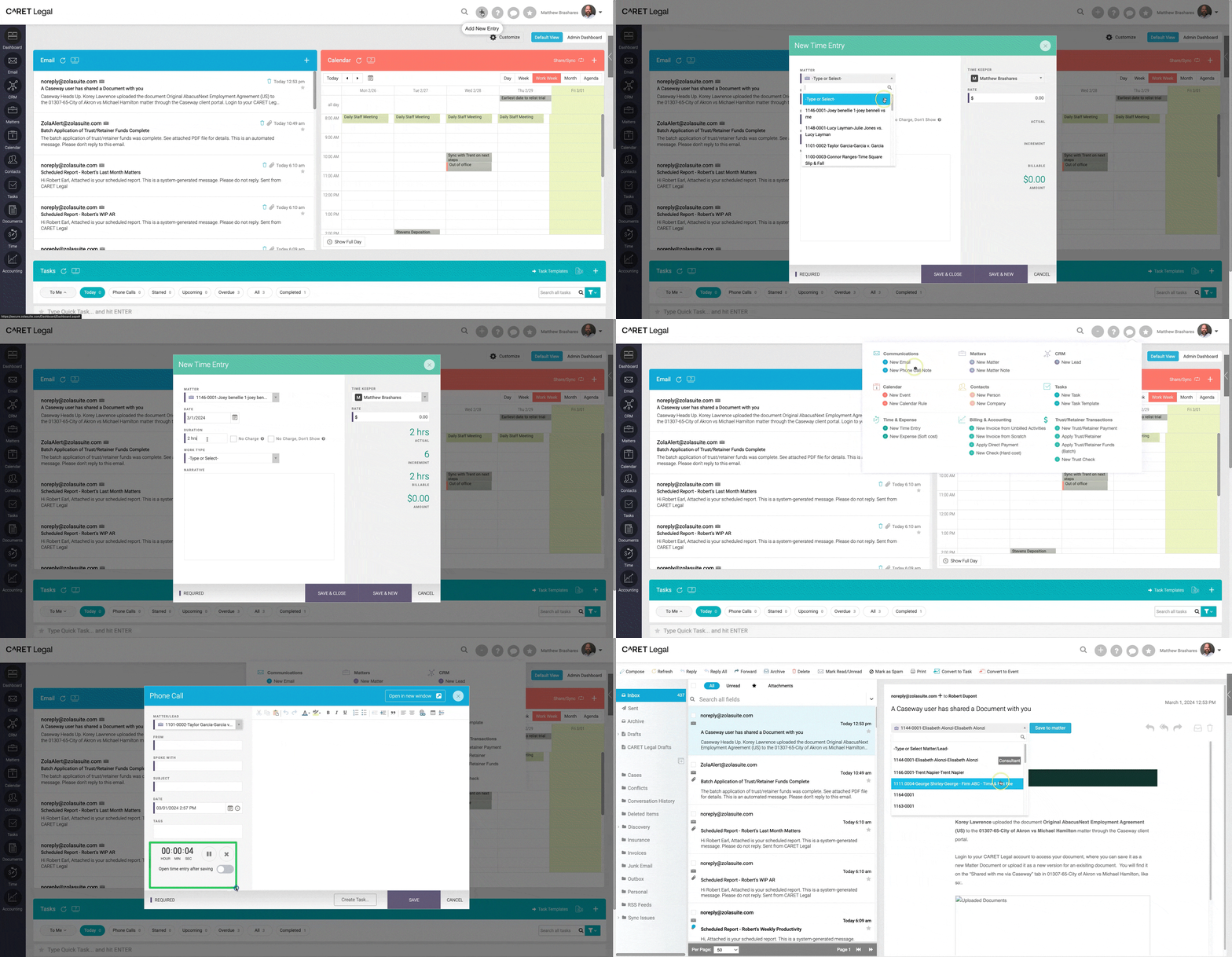
- Use built-in timers. If your platform offers one-click timers tied to specific matters, make them the default. Attorneys should be able to start a timer without navigating away from what they’re doing.
- Convert activities into time entries. Look for the ability to turn calendar events, emails, and completed tasks into time entries directly, reducing the need for manual reconstruction.
- Consider passive timekeeping. Some platforms track attorney activity in the background while you’re working. This catches the brief tasks, like short phone calls or quick emails, that are easiest to forget.
- Set a firm-wide policy on contemporaneous entry. Technology helps, but culture matters too. Establish a clear expectation that time is recorded as work happens, not reconstructed later. Accurate time tracking starts with making entry frictionless and setting firm-wide expectations around it.
Even small improvements compound quickly and increase billable hours over time. An attorney who captures an extra 15 minutes of billable time per day adds roughly 47 billable hours over the course of a year.
Step 4: Close the Billing-to-Collection Gap
Bloomberg Law’s survey data shows that the 12-hour weekly gap between hours worked and hours billed represents a significant revenue drain for firms of all sizes. But even when time gets tracked accurately, slow or clunky invoicing processes can delay collection further. Work that gets completed and recorded can still fall off the table if the path from time entry to payment involves too many manual steps.
How to Shorten Billing and Collection Timing
The goal is a clean pipeline from tracked time to paid invoice with as few handoffs as possible.
- Connect time tracking to invoicing. The platform you use for time entry should feed directly into invoice generation. If creating an invoice requires exporting data, reformatting it, or re-entering it in a separate billing tool, that friction is costing the firm money and time.
- Offer clients easy payment options. Secure online payment portals reduce the back-and-forth that typically delays collection. Clients who can pay directly from an invoice link are more likely to pay promptly.
- Maintain clean trust accounting. Built-in safeguards that tie each payment to its respective client and matter prevent misapplied retainers and support compliance during audits or reviews.
- Review billing data regularly. Track realization rates (how much of the time worked actually gets billed) and collection rates (how much of what’s billed actually gets paid). Firm analytics can surface these metrics without requiring manual spreadsheet work, and gaps in either number point to specific process problems worth fixing.
How These Gains Compound
Each step above delivers value on its own. Together, the gains multiply.
When an attorney no longer enters data twice, searches for scattered documents, reconstructs time entries, or manually tracks every task, the cumulative time savings across a firm become significant. If a firm with 20 attorneys recovered just 15 minutes of billable time per attorney per day, that would add roughly 936 billable hours per year. No overtime. No added headcount.
What the Data Shows
| Metric | Industry Finding |
| Attorney billable time per week | 36 out of 48 hours worked |
| Time spent on administrative duties | 2 out of every 8 working hours |
| Attorney burnout rate | 42% of the time on average |
| Admin errors in malpractice claims | 23% of all claims |
| Technology’s impact on task completion | 30% of legal professionals finish tasks in less time |
Sources: Bloomberg Law 2024 Attorney Workload & Hours Survey; ABA malpractice claims data; Association of Legal Administrators
The productivity gains go beyond billing more hours. They improve law firm efficiency at every level, giving attorneys the space to do higher-quality work, respond to clients more promptly, and focus on the strategic thinking that sets strong firms apart.
Where to Start
Overhauling every process at once isn’t realistic. A phased approach works better.
Start With Visibility
Track how attorneys and staff spend their days for a representative period. Identify which non-billable tasks consume the most time and where the biggest gaps exist between time worked and time billed. Tackling inefficient time management starts with knowing where the problems actually are.
Consolidate
If the firm runs separate systems for intake, case management, billing, document storage, and communication, bringing those into a single platform should be the top priority. Everything else builds on that foundation.
Add Automation Where It’s Obvious
Pick the case types the firm handles most frequently and build workflow templates for them. Start simple and expand over time.
Measure What Changes
Track utilization rates, realization rates, and collection metrics. Let the data guide what to refine next.
See What Your Firm Looks Like Without the Friction
Every step outlined above, from centralizing case data to automating workflows to capturing time in real time to streamlining billing, is exactly what CARET Legal was built to do.
The platform brings it all together in one cloud-based system so attorneys spend more of their day practicing law and less of it managing the business of practicing law.
Schedule a free demo to see how it works for your firm.